
Your cart is currently empty
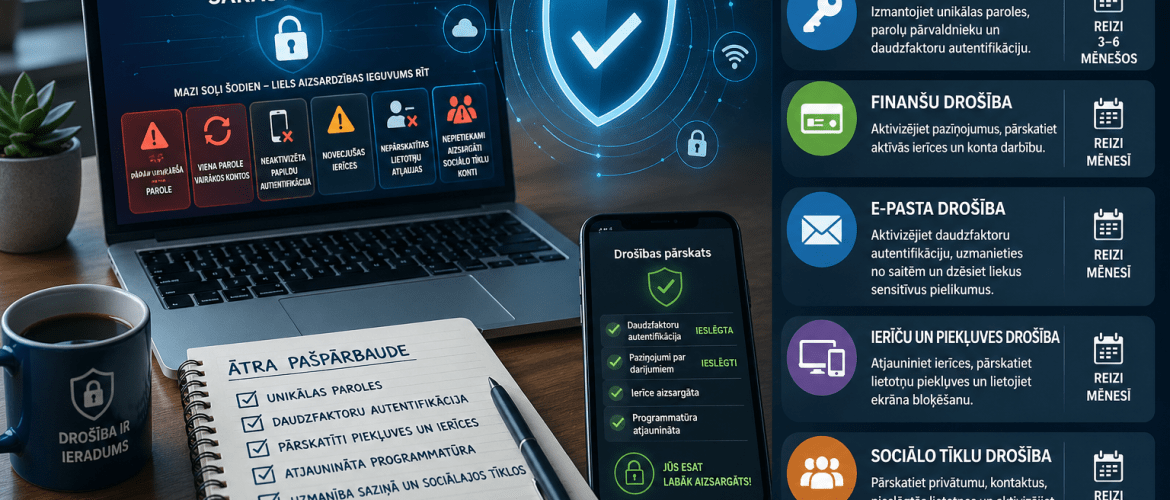
A portion of cybersecurity incidents begin not with a complex attack, but with everyday, unnoticed security vulnerabilities: passwords that are too simple, using the same password for multiple accounts, unactivated two-factor authentication, outdated devices, unreviewed app permissions, or insufficiently protected social media accounts.
The significance of such shortcomings becomes apparent when they allow unauthorized individuals to access email, financial accounts, company documents, client information, or personal data. Therefore, cybersecurity must be understood not only as the competence of IT specialists but also as a daily organizational and personal responsibility.
The checklist offers a structured way to transform digital risks into specific, verifiable questions. It helps to evaluate five essential areas step-by-step: passwords, financial security, email security, device and access security, and social network security.
Why is digital security relevant
Available European and Latvian data indicate that cybersecurity risks remain significant and practically relevant. The ENISA 2025 Cybersecurity Threat Landscape report analyzes 4,875 incidents from July 1, 2024, to June 30, 2025. This leads to the conclusion that the threat landscape in Europe remains broad and dynamic. [1]
Latvian data also shows that these risks are not just theoretical. The CERT.LV report for Q3 2025 states that 671 cyber incidents were registered in Latvia, while the number of identified compromised devices increased by 111% compared to Q2 2025 and by 36% compared to the corresponding period of the previous year. [2]
Internationally, a similar picture is painted by Verizon's 2025 Data Breach Investigations Report, which analyzed 22,052 security incidents, including 12,195 confirmed data breaches. The report also states that exploitation of vulnerabilities as an initial access vector accounted for 20% of breaches. [3]
Overall, this data supports the conclusion that basic digital security measures are not a formal requirement. Secure and unique passwords, multi-factor authentication, regular updates, and reviewed access are practical control mechanisms that help mitigate the risk of account takeovers, data breaches, and financial fraud.
Why a checklist is needed
The checklist is not intended as a full IT audit. Its function is to help you regularly check key security habits and spot areas where unnecessary risks may arise in everyday use.
Its main value is the ability to break down complex security issues into simple, verifiable actions. A user or company can check if additional authentication is enabled for email, if transaction alerts are turned on for bank statements, if old devices are no longer linked to accounts, and if unnecessary third-party app access is removed from social networks.
This approach helps to spot vulnerabilities early, before they become a real incident. This is why a checklist is not just a collection of tips, but a practical risk mitigation tool.
First layer of account protection
Although authentication technologies are evolving, passwords remain the first layer of account protection for many services. NIST recommends using multi-factor authentication, password managers, and passwords at least 15 characters long, if a password must be used. [4]
There is a significant risk of password reuse, as a leak in one account can have a knock-on effect on other services. For example, if the same password is used for email, online shopping and social networks, a single data leak could compromise several accounts at the same time.
It is especially important to protect your email, as in many cases it serves as a hub for your digital identity: passwords are reset through it, and access to other services is managed.
Practical steps: Use a unique password for each important account, store passwords in a trusted password manager, and enable multi-factor authentication wherever possible. [5]
Financial security: early detection and response
Bank, payment, and other financial accounts must be protected with extreme care. Passwords that are already used on other websites or apps should not be used for these accounts.
It is important to activate notifications for connections, payments, card transactions, and the addition of new devices. Such alerts help to notice suspicious activity faster and react in a timely manner.
Biometric access can improve ease of use and access control, but should be seen as part of a broader security regime and not as a complete substitute for account activity verification.
Practical steps: review your internet banking and payment app connection history, active devices and security settings at least once a month.
Email Security: The Hub of Digital Identity
In many cases, email acts as a digital identity hub for updating passwords, receiving invoices, sending documents and managing access to other services.
For this reason, taking over an email account can be the starting point for wider access to other accounts, documents and communication channels. An attacker can use email access to try to reset passwords on other services or send fake messages to contacts.
You should be especially careful of phishing emails. They may mimic a bank, a delivery company, a government body or a well-known service provider. Such emails often create a sense of urgency for the user to open a link, enter a password or confirm a payment. CISA's Digital Security Guidelines place particular emphasis on recognising phishing and reporting suspicious attempts. [5]
Practical steps: do not enter passwords in links received in suspicious emails or text messages. If the message looks urgent, check the details on the official website instead of using the link sent.
Device and access security
Computers, phones, and tablets are the main access points for email, banking, documents, and work systems. If a device is not protected, all the accounts used on it can be compromised.
Regular updates are essential as they often fix security vulnerabilities. Delaying updates extends the time a device can remain vulnerable to known security flaws. CISA highlights software updates as one of the basic security habits. [5]
It's just as important to review app permissions. Many apps have access to your camera, microphone, location, files or contacts. If you don't need this access, you should remove it.
Practical steps: regularly update devices, use screen locks, and review which apps have access to sensitive information.
Social media safety
Social networks contain personal, professional and reputational information. Account takeovers can be used to send fraudulent messages, false advertising, damage reputations or launch further attacks against contacts.
Therefore, social network security should be evaluated not only as a privacy issue, but also as a risk to reputation, trust, and future fraudulent activities. Here too, multi-factor authentication should be activated, privacy settings reviewed, and unnecessary third-party apps removed. [5]
Practical steps: check who sees the information you post, remove contacts you don't recognise and disconnect apps you no longer use.
Practical Tests Table
| Joma | The main risk | Recommended action | How often to check |
| Passwords | Using one password for multiple accounts | Use unique passwords, password manager and multi-factor authentication | Every 3-6 months |
| Financial security | Unauthorised payments or connections | Activate notifications, review active devices and account activity | Once a month |
| Email security | Account takeover and sensitive information leakage | Activate multi-factor authentication, be wary of links, and delete unnecessary sensitive attachments. | Once a month |
| Device and access security | Novelty systems and excessive app permissions | Update devices, review app permissions, and use screen lock | Once a month |
| Social media safety | Account takeover, fake profiles, and reputational risk | Review privacy, contacts, connected apps, and enable multi-factor authentication | Three times every 3 months |
How a checklist helps businesses
In companies, cybersecurity is not just a technical issue. It is also part of employee habits, access rights, information flow, and internal discipline.
One weak account can pose a risk to the entire organization. If an employee's email is compromised, it can be used to send fake invoices, obtain customer data, or gain further access to company systems.
A checklist can be used as training material for employees, for internal self-assessment, or for regular digital hygiene reviews. It helps to discuss the most essential questions in a simple way: are passwords unique, is multi-factor authentication enabled, are access rights current, are devices being updated, and is sensitive information not being stored insecurely.
Such a tool can be especially important for small and medium-sized businesses, where cybersecurity responsibilities are often divided among employees without a dedicated security department.
Conclusion
Cybersecurity in practice begins with regular, repeatable habits: checking accounts, reviewing access rights, performing updates, and being cautious in communications. These measures are not complex, but they significantly reduce risk.
A practical checklist helps you not to miss the most important things and turn digital security into a regular habit—for both individuals and businesses.
Download Practical Cybersecurity Checklist in PDF format and use it as a simple self-assessment tool to improve your daily digital security.
Sources and useful references
[1] ENISA. ENISA Threat Landscape 2025. European Union Agency for Cybersecurity, 2025. Site
[2] CERT.LV. Q3 2025 in Latvian Cyberspace. CERT.LV, 2025. Site
Verizon. 2025 Data Breach Investigations Report. Verizon Business, 2025. Site
[4] NIST. How Do I Create a Good Password? National Institute of Standards and Technology, 2025. Site
CISA. Secure Our World. Cybersecurity and Infrastructure Security Agency. Site